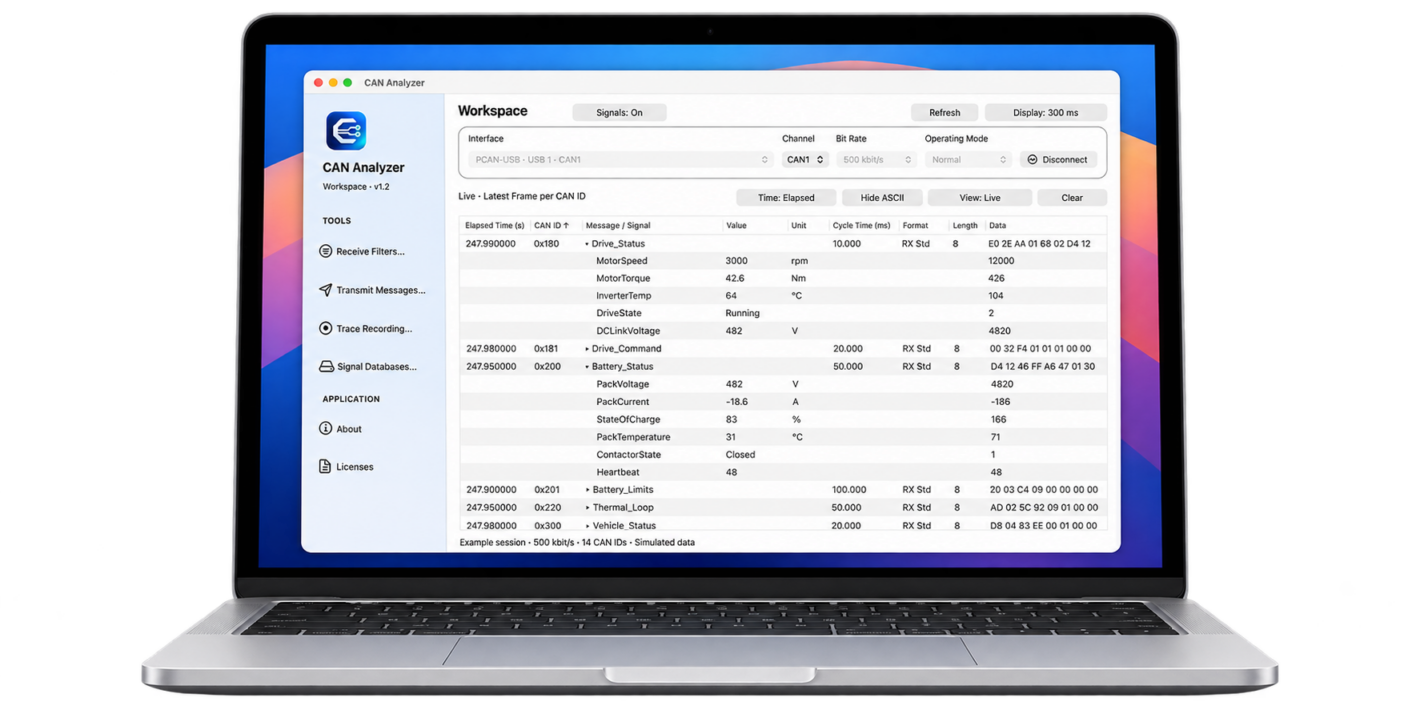
Receive CAN messages, understand signals, transmit your own frames and record test sessions. Developed by 35b0.de, CAN Bus Analyzer brings the tools you need for working with CAN networks into a native macOS application.
The workspace keeps live traffic easy to follow. Instead of continuously scrolling, the live view updates the latest message for each CAN ID in place. When the order of events matters, switch to the chronological trace view to examine individual frames as they arrive.
From Raw Bytes to Meaningful Signals
Bring your DBC and SYM files into the workspace and turn hexadecimal payloads into readable signal names, values and units.
A message might contain motor speed, torque and temperature. Expand it in the live view to inspect each signal individually. The decoder supports Intel and Motorola byte order, signed values, scaling, offsets, value labels and basic multiplexing.
Multiple databases can be imported and enabled individually. If active databases contain conflicting definitions for the same CAN ID, the app highlights the conflict. Some advanced DBC and SYM features are not yet supported.
Monitor, Transmit and Record
Use a receive whitelist or blacklist to focus on the messages that matter to your investigation. Configure multiple transmit messages with individual CAN IDs, payload bytes and cycle times, then send them once or cyclically.
Record test sessions in a dedicated window and export them as CSV or ASC. Recordings preserve the original CAN frames independently of display filters and decoded signal expansion.
Separate windows for filters, transmission, databases and recording keep live traffic visible while you prepare your next test.
Compatible USB Interfaces
Hardware access is provided through MacCAN / PCBUSB, whose driver supports:
- PEAK PCAN-USB — IPEH-002021 / IPEH-002022
- PEAK PCAN-USB FD — IPEH-004022
- PEAK PCAN-USB Pro FD — IPEH-004061, CAN1 only
Compatibility follows the underlying driver. Not all listed models have been individually tested with the app.
The current version supports Classical CAN with standard and extended identifiers. CAN FD and LIN communication are not currently supported, including when using an FD-capable interface.
A compatible USB interface and a correctly configured CAN bus are required to receive and transmit messages.
Questions and Support
Have a question, need help getting connected or have an idea for a future feature? Leave a comment below or contact me by email using the details in this website’s Contact section.
For technical questions, please include your macOS version, app version, interface model and a short description of the issue.
CAN Bus Analyzer is independently developed by 35b0.de and is not affiliated with, endorsed by, or sponsored by PEAK-System. All trademarks belong to their respective owners.